Best-before dates for your SharePoint documents.
SharePointTeamsPower Automate
from £499 a year

 Image Maps
 NavPilot
 Advanced Tabs
 HTMLPoint
 Power Popups
 Alerts Fusion
 Short URL
 QR Code Drop
 DirectoryPoint
 HRPoint
 OnboardPoint
 GovernPoint
 ExposurePoint
 UsagePoint
 InvitePoint
 ExpiryPoint
 Handover Pro
 EquipPoint
 TidyPoint
 DisposalPoint
Keep what you must. Dispose of the rest, with sign-off and a sealed certificate.
DisposalPoint gives SharePoint a retention schedule, shows what is due for disposal and routes it for sign-off in one to three stages. A register and a sealed certificate record what went, who approved it and where it went, without Microsoft 365 E5 or the Purview Suite.
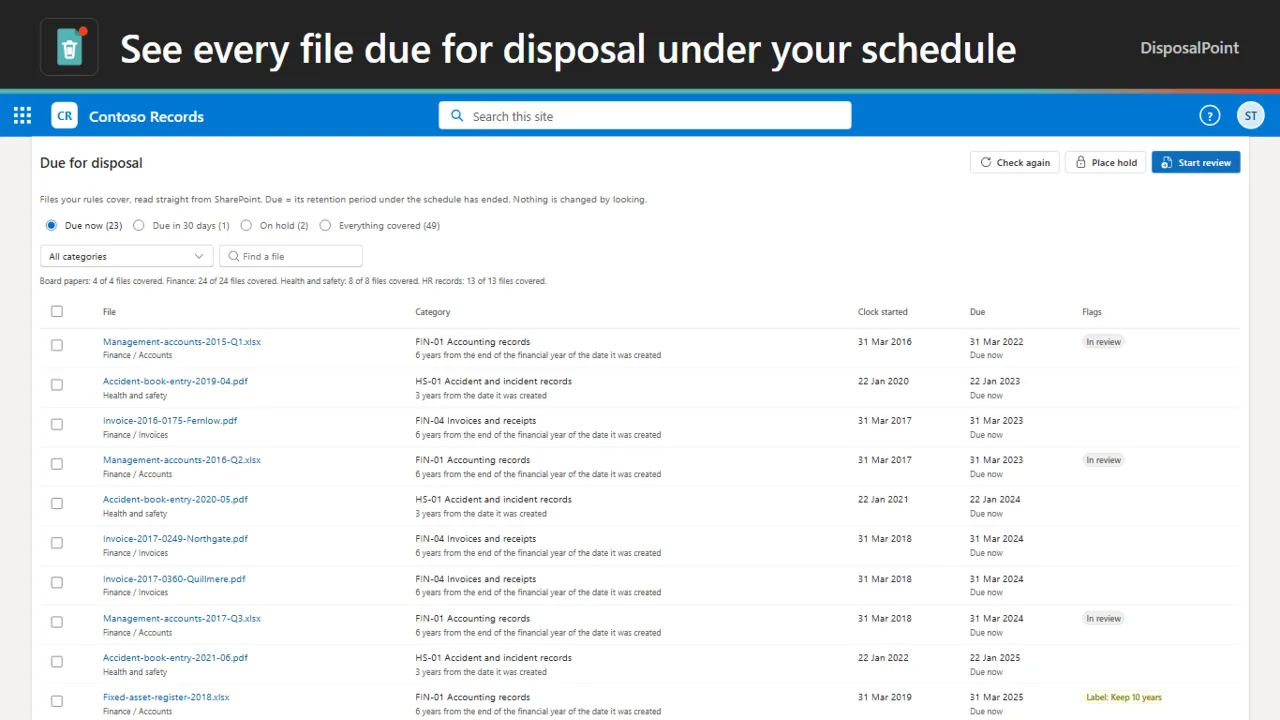
See every file due for disposal under your schedule
DisposalPoint gives SharePoint a retention schedule and disposal with sign-off, for organisations on Microsoft 365 Business Premium or E3 without E5 or the Purview Suite. It keeps the schedule, shows which files are due, routes them for approval and moves approved files to the site's recycle bin, where a site owner can restore them. Every review ends with a disposal certificate sealed with SHA-256. It asks for no Microsoft Graph permission and no admin consent, and it does not replace Microsoft Purview or stop Microsoft's own retention from working.
Categories of record, how long each is kept and from when, and who approves disposal, in one to three stages. Start from cited UK starter schedules, starting points to check with your adviser.
Every file whose retention period has ended, read straight from SharePoint, by rules on libraries, folders, content types or column values. Looking changes nothing.
The chosen files are sealed with SHA-256 and go through the category's approval stages. Approvers approve, keep some files for longer or reject.
Keep a claim, an information request or an investigation out of disposal, on a file, a folder, a library, a category or a whole site.
Each file is read again first, and anything changed, moved, on hold or marked as a record is skipped. The rest moves to the site's recycle bin, where a site owner can restore it.
A disposal certificate for every review, checkable at any time with Verify, and a register row for every file after it has gone, with CSV export.
A short look at the app working, on real screens.
Records leads · Information governance teams · Site owners · Microsoft 365 administrators
14-day free trial. Annual pricing in pounds, excluding VAT, with updates and support included.
Also included in All Access and IT and Copilot Pack.
Bigger than the largest plan? Ask us for a quote. Full details on disposalpoint.app, or compare all prices.
Yes. DisposalPoint keeps a retention schedule, shows which files are due for disposal and routes them for approval in one to three stages, on Microsoft 365 Business Premium or E3 without E5 or the Purview Suite. A sealed certificate records what was disposed of and who approved it.
No. Dispose moves each approved file to the site's recycle bin, which SharePoint keeps for up to 93 days from the deletion, and a site owner can restore it from the disposal register while it is in the first-stage recycle bin. A site owner can choose to delete disposed files from the recycle bin straight away instead: that setting is off by default.
GBP 499 a year for one site, GBP 999 for up to 10 sites or one site collection, GBP 2,999 for every site in a tenant and GBP 4,999 for Tenant Plus, excluding VAT, with unlimited items, reviews and people and 30 percent off for education and charities.
Best-before dates for your SharePoint documents.
When people move on, their work stays.
Asset management that lives in SharePoint and Teams.