Best-before dates for your SharePoint documents.
SharePointTeamsPower Automate
from £499 a year

 Image Maps
 NavPilot
 Advanced Tabs
 HTMLPoint
 Power Popups
 Alerts Fusion
 Short URL
 QR Code Drop
 DirectoryPoint
 HRPoint
 OnboardPoint
 GovernPoint
 ExposurePoint
 UsagePoint
 InvitePoint
 ExpiryPoint
 Handover Pro
 EquipPoint
 TidyPoint
 DisposalPoint
See where the space went. Then clear it, with approval and a record.
TidyPoint shows what is using each SharePoint site's storage and what it would cost at Microsoft's pay-as-you-go rate. Old versions and files go to the recycle bin only after a named site owner approves, and every removal is recorded.
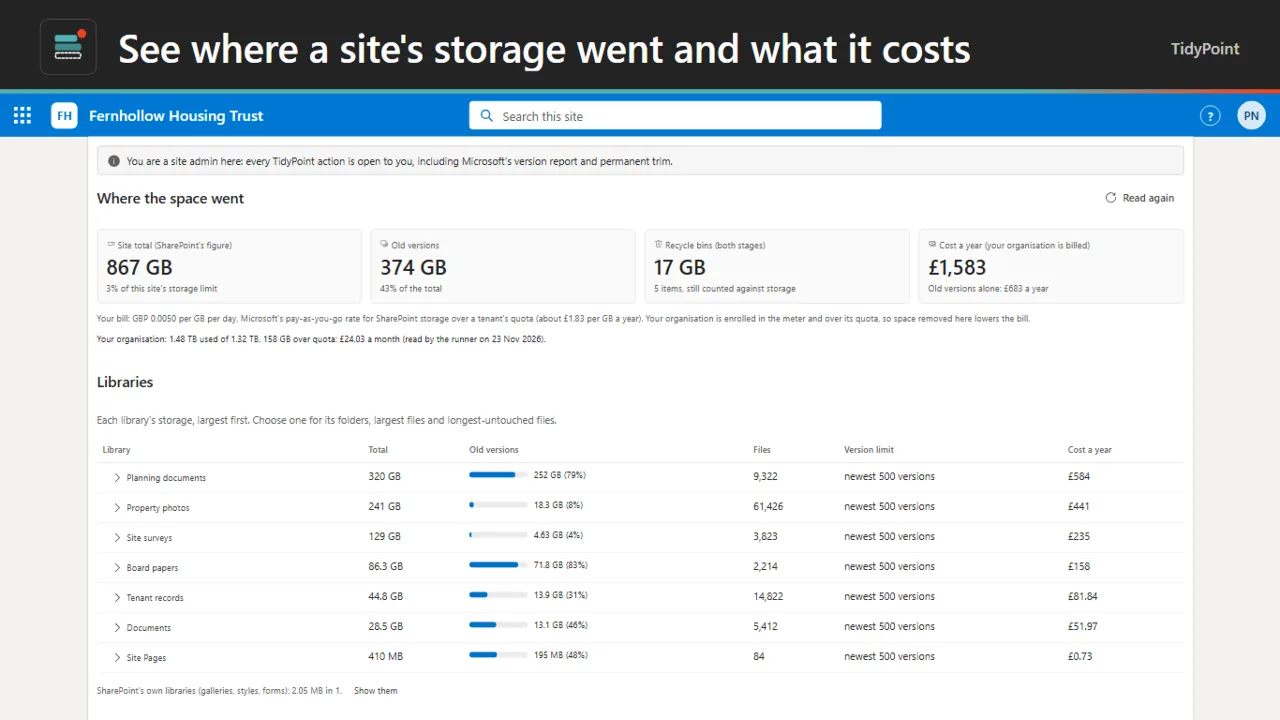
See where a site's storage went and what it costs
TidyPoint gives the people who own each SharePoint site the view, the clean-up and the record for its storage. It shows each library's size and the share held by old versions, the largest and longest-untouched files and the recycle bin, in pounds at Microsoft's pay-as-you-go rate. A named site owner approves every clean-up, each item goes to the recycle bin with a record of who asked, who approved and what went, and Restore brings it back. From January 2027 Microsoft can bill SharePoint storage over a tenant's quota by the gigabyte. TidyPoint asks for no Microsoft Graph permission and no admin consent.
Each library's size and the share held by old versions, its folders, the largest and longest-untouched files, and the recycle bin.
Pounds a year at Microsoft's published pay-as-you-go rate, shown as your bill only when your administrator says the tenant is enrolled and over its quota.
Choose old versions by a rule and large or untouched files. A named site owner approves, and each goes to the recycle bin with a record of who asked, who approved and what went.
See what still sits in the recycle bin and restore it, and see what has left it: space given back.
Set version limits with a plain warning. Site admins see Microsoft's own version report and what-if before they can queue its permanent trim, confirmed by typing the name.
The TidyPoint runner, a Power Automate flow your organisation imports and owns, records growth by library, very large new files and the recycle bin, and can email your administrators.
A short look at the app working, on real screens.
Site owners · Site admins · IT teams · Microsoft 365 administrators
14-day free trial. Annual pricing in pounds, excluding VAT, with updates and support included.
Also included in All Access and IT and Copilot Pack.
Bigger than the largest plan? Ask us for a quote. Full details on tidypoint.app, or compare all prices.
TidyPoint shows what is using each site's storage and what it would cost at Microsoft's pay-as-you-go rate. Anyone who can edit the site can plan a clean-up of old versions and files, a named site owner approves it, and each item goes to the recycle bin with a record of every removal.
A clean-up does not: approved versions and files go to the site's recycle bin, where they can be restored for up to 93 days from deletion. Two things are permanent, and TidyPoint says so first: a lower version limit, and Microsoft's trim job, which only a site admin can queue, after a what-if.
GBP 499 a year for one site, GBP 999 for up to 10 sites or one site collection, GBP 2,999 for every site in a tenant and GBP 4,999 for Tenant Plus, excluding VAT, with 30 percent off for education and charities.
Best-before dates for your SharePoint documents.
When people move on, their work stays.
Asset management that lives in SharePoint and Teams.