
 Image Maps
 NavPilot
 Advanced Tabs
 HTMLPoint
 Power Popups
 Alerts Fusion
 Short URL
 QR Code Drop
 FollowPoint
 DirectoryPoint
 HRPoint
 OnboardPoint
 GovernPoint
 ExposurePoint
 UsagePoint
 InvitePoint
 VerifyPoint
 AgentPoint
 ExpiryPoint
 Handover Pro
 EquipPoint
 TidyPoint
 DisposalPoint
What Microsoft Teams does for leave on its own
- Shifts. Built for frontline teams that work to a schedule. A worker requests time off for a whole day or part of one, chooses a reason and can add a note. The request goes to their manager, who approves or denies it, approved time off appears on the schedule, and both are told in the Teams activity feed.
- Approvals. An approvals hub in Teams for requests sent from a chat, from a template or by a Power Automate flow, with a card that shows who has responded. Microsoft names requesting time off as one of its uses. Approvals are stored in Microsoft Dataverse, where only the people on an approval and a tenant admin can see them.
- Out of office. Schedule an out of office status and message from your profile picture or from Settings. Teammates see it when they message you, and it syncs with automatic replies in Outlook.
- Lists. A Microsoft List added as a channel tab can hold leave requests the whole team can see. Lists created in Teams are saved to SharePoint.
What Teams does not do for UK leave
Each of these handles a request. None of them knows how much holiday a person is entitled to under UK rules:
- Entitlement. Almost all workers are entitled to 5.6 weeks of paid holiday a year, so a five-day worker gets at least 28 days and a three-day worker at least 16.8 days.
- Irregular hours. For leave years starting on or after 1 April 2024, irregular-hours and part-year workers build up holiday from the hours they have worked, rather than getting a fixed number of days.
- Bank holidays. They differ between England and Wales, Scotland and Northern Ireland, and an employer can choose to count them as part of statutory leave.
- Balances and carry-over. What has been taken, what is booked, what is left and what rolls into next year.
- Overlaps. Who else in the team is already off on the days requested.
The UK notice rules for booking leave
A leave process in Teams should follow the statutory notice rules, unless the employment contract says something different. An employer can refuse leave at a particular time, but cannot refuse to let workers take their leave at all.
| Situation | How much notice | Example |
|---|---|---|
| A worker books leave | At least twice the length of the leave, plus 1 day | 3 days' notice for 1 day off |
| An employer refuses or cancels leave | As long as the leave requested, plus 1 day | 11 days' notice for a 10-day request |
| An employer tells staff when to take leave | At least twice the length of the leave | 2 weeks' notice for a week off at Christmas |
How to set up leave management in Teams
- Pick one place to ask. Shifts for frontline teams on a rota, or a leave list or HR app pinned as a tab for everyone else. Two ways to ask means two sets of records.
- Route every request to an approver. A Power Automate flow on the list can start an approval that the manager answers in the Approvals app, or the HR app does the routing for you.
- Show who is off. Put a calendar view of approved leave on the team's channel tab, so a manager sees overlaps before approving.
- Set out of office for approved leave. Ask people to schedule their out of office in Teams, which also turns on their Outlook automatic replies.
- Keep sickness separate. Sickness reasons are health data. Record the dates where managers can see them and keep the reasons where only HR can.
- Work out balances properly. Either build and maintain the UK rules yourself, or use an HR app that has them.
For a step-by-step build of the list, the calendar view and the approval flow, see the SharePoint leave tracker guide.
How HRPoint manages leave in Teams
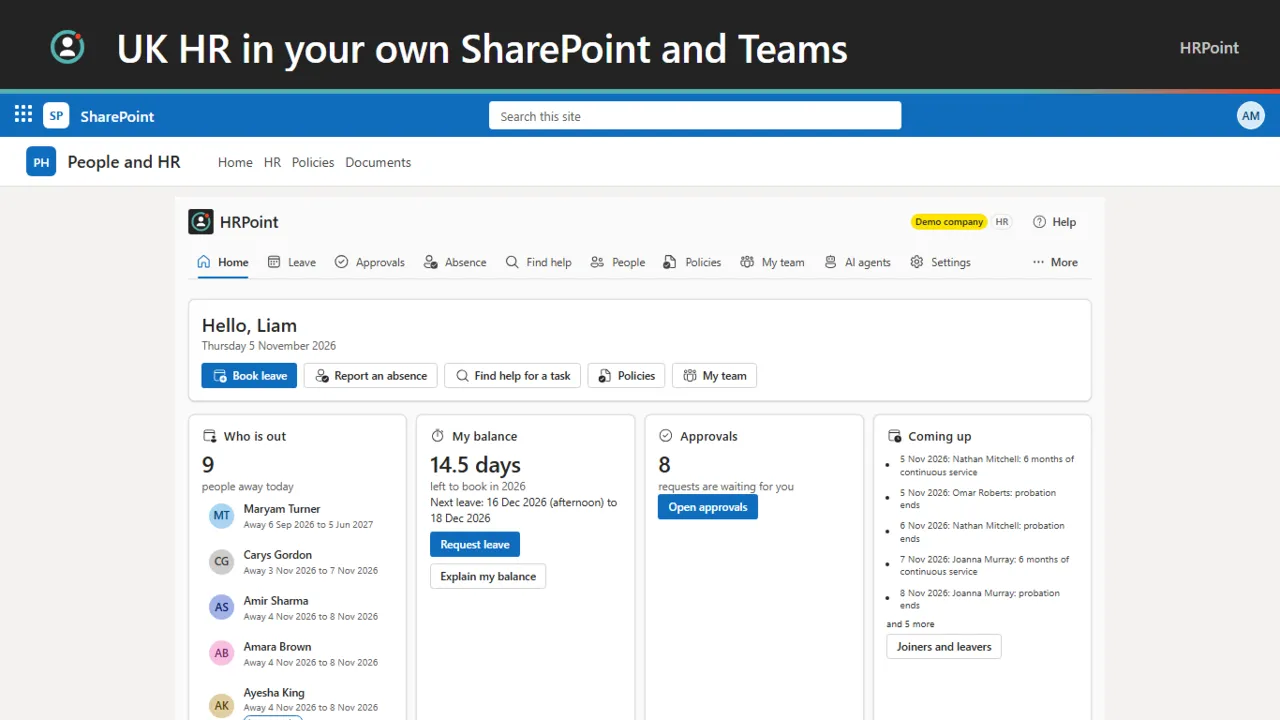
HRPoint runs in Microsoft Teams and on SharePoint in your own tenant, and its first screen answers the day: who is out, your balance and your approvals. Holiday is worked out in days or hours, pro-rata, for irregular hours, with each nation's bank holidays and carry-over, and every balance has an "Explain my balance" view.
Before a request is sent, it shows who else in the team is off. Managers approve from one approvals inbox, every approval keeps a decision record, and sickness is recorded with fit notes and day-one Statutory Sick Pay while a manager sees the dates and the category, never a diagnosis. Staff use the Microsoft 365 account they already have, on a desk or on a phone, from £395 a year with a 14-day free trial.
Sources
Checked on 26 November 2026. Rules and Microsoft 365 features change, so check the source before you rely on a detail.
- Microsoft Support: Request time off in Shifts
- Microsoft Support: Manage shift requests and time off in Shifts
- Microsoft Support: What is Approvals?
- Microsoft Support: Schedule an out of office status in Microsoft Teams
- Microsoft Support: Get started with Lists in Teams
- GOV.UK: Holiday entitlement
- GOV.UK: Holiday entitlement, booking time off
- GOV.UK: UK bank holidays
- ICO: Special category data