
 Image Maps
 NavPilot
 Advanced Tabs
 HTMLPoint
 Power Popups
 Alerts Fusion
 Short URL
 QR Code Drop
 FollowPoint
 DirectoryPoint
 HRPoint
 OnboardPoint
 GovernPoint
 ExposurePoint
 UsagePoint
 InvitePoint
 VerifyPoint
 AgentPoint
 ExpiryPoint
 Handover Pro
 EquipPoint
 TidyPoint
 DisposalPoint
How to build a simple leave tracker in SharePoint
- Create a list called Leave requests, with columns for Employee (person), Leave type (choice: Holiday, Sickness, Compassionate, Unpaid, Other), Start date, End date, Half day (yes or no), Days requested (number), Approver (person) and Status (choice: Requested, Approved, Declined, Cancelled).
- Add a calendar view on the start and end dates, filtered to approved requests, so the team can see who is off.
- Build an approval flow in Power Automate: when an item is created, start an approval for the approver, then update Status with the outcome and email the employee.
- Add an allowance list with each person's entitlement for the leave year, and a flow or view that takes off approved days.
- Pin it in Teams as a tab in the team's channel, so people ask for leave where they already work.
This works for a small team on the same working pattern. It gets harder as soon as people work different hours.
Where a do-it-yourself tracker breaks
- Part-time and pro-rata. A list does not know that someone working three days a week is entitled to 16.8 days, not 28.
- Irregular hours. For leave years starting on or after 1 April 2024, holiday for irregular-hours and part-year workers builds up at 12.07% of the hours worked each pay period, so the balance changes every payday.
- Bank holidays. England and Wales usually have 8 a year, Scotland 9 and Northern Ireland 10. Whether they come out of the allowance depends on each contract.
- Half days and hours. Shift and part-day workers often need leave in hours, not days.
- Carry-over. What can roll into next year, how much, and when it expires.
- Overlaps. Seeing who else in the team is off before a request is approved.
- Sickness privacy. Sickness reasons are health data, so they should not sit in a list the whole team can read.
Each one can be solved with more columns and flows, but somebody has to maintain them, test them every leave year and explain the numbers when a balance looks wrong.
UK holiday entitlement at a glance
These are the statutory minimums. Many contracts give more, and your tracker should follow the contract.
| Working pattern | Statutory minimum | How it is worked out |
|---|---|---|
| 5 days a week | 28 days | 5.6 weeks x 5 days. Bank holidays can be included. |
| 3 days a week | 16.8 days | 5.6 weeks x 3 days. |
| 6 days a week | 28 days | Statutory paid holiday is capped at 28 days. |
| Regular hours, for example 30 a week | 168 hours | 5.6 weeks x 30 hours. |
| Irregular hours or part-year, leave years from 1 April 2024 | 12.07% of hours worked | Builds up at the end of each pay period. |
Leave requests in Microsoft Teams
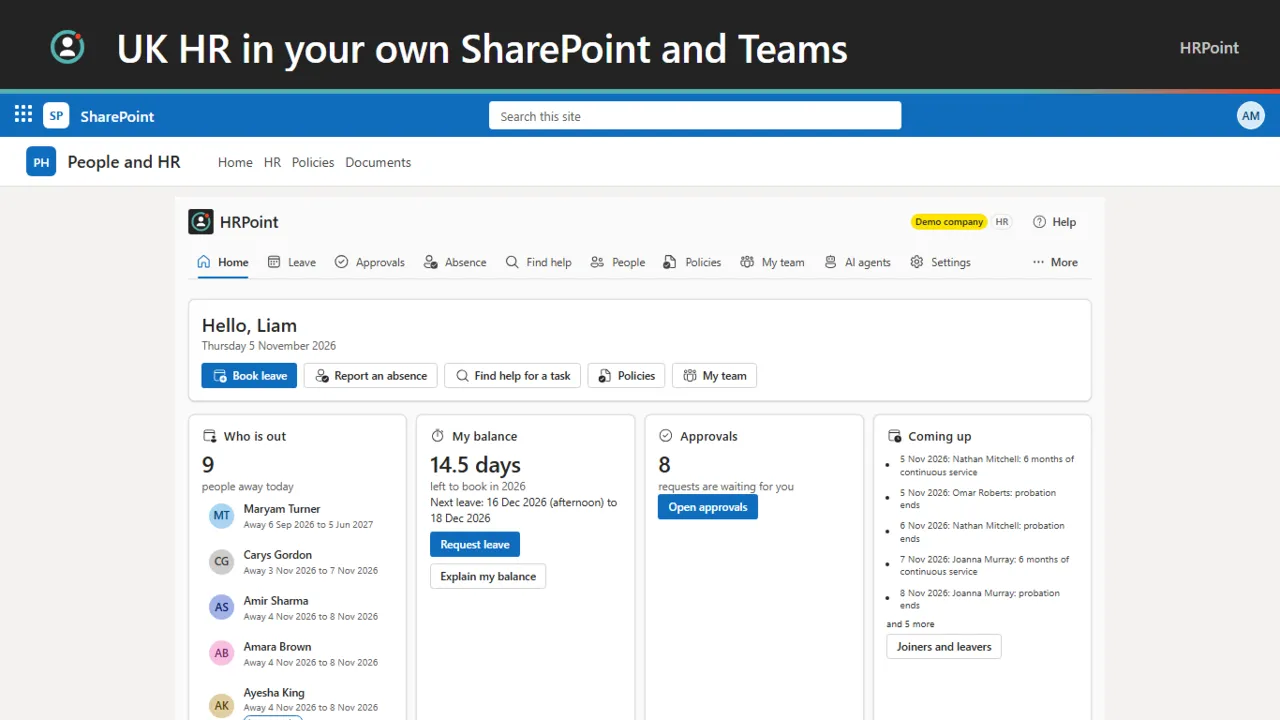
Staff are more likely to use a tracker that sits where they work. Pin the list, or the HR app, as a tab in each team's channel or add it to the Teams app bar, so a request is two clicks away. Approvals started by Power Automate also appear in the Approvals app in Teams, and a calendar view on the tab shows who is out today.
For Shifts time off, the Approvals app and the UK notice rules for booking leave, see leave management in Microsoft Teams.
How HRPoint tracks leave
HRPoint works out holiday in days or hours: pro-rata, irregular hours, each nation's bank holidays and carry-over, with an "Explain my balance" view on every balance. Before a request is sent it shows who else in the team is off, and every approval keeps a decision record.
Sickness is recorded with fit notes, return to work and day-one Statutory Sick Pay, and a manager sees the dates and category, never a diagnosis. It runs on SharePoint in your own tenant and in Microsoft Teams, from £395 a year with a 14-day free trial.
Sources
Checked on 26 November 2026. Rules and Microsoft 365 features change, so check the source before you rely on a detail.