
 Image Maps
 NavPilot
 Advanced Tabs
 HTMLPoint
 Power Popups
 Alerts Fusion
 Short URL
 QR Code Drop
 FollowPoint
 DirectoryPoint
 HRPoint
 OnboardPoint
 GovernPoint
 ExposurePoint
 UsagePoint
 InvitePoint
 VerifyPoint
 AgentPoint
 ExpiryPoint
 Handover Pro
 EquipPoint
 TidyPoint
 DisposalPoint
What Microsoft Teams gives you to find people
Teams has four built-in ways to find a colleague. All of them read the same Microsoft 365 profile data.
- Search and the profile card. Search for a name in Teams, or select someone's picture in a chat or channel, and their profile card opens. Depending on your organisation, it shows their photo, contact details, availability and working location, their place in the org chart and the people they work with.
- The Organization tab. On a profile, the Organization tab shows who the person reports to and who reports to them, and you can search for other people from there. It is not available in every organisation: your Teams admin must turn it on.
- Org Explorer. A Microsoft app in Teams, Outlook and Microsoft 365 that shows a person's manager chain, peers, the people reporting to them and the people they work with, with filters for working location, job title and skills where your organisation uses People Skills. It is available to organisations with an Enterprise or Education licence, and in Teams each person adds it from the apps menu.
- The People app. Your own contacts in Teams: save colleagues from the directory, add personal contacts, and sort them into favourites and categories. It is a contact list for one person, not a directory the organisation shares.
Where the built-in options stop
The built-in options are free and always as current as Microsoft 365, which is a real strength. What they do not give you is a directory people can browse:
- One person at a time. Search and profile cards work person by person. There is no page that lists everyone in Finance or everyone in one office.
- Only what is in the profile. Teams shows the job title, department, manager and photo held for each person in Microsoft Entra ID. If those are blank or wrong, every option above is blank or wrong too.
- Settings and licences. The Organization tab needs your Teams admin to turn it on, Org Explorer needs an Enterprise or Education licence, and its skills filter only appears where your organisation uses People Skills.
- People outside the organisation. A contractor or supplier someone saves in the People app is saved for them alone, so colleagues cannot find it.
Add a directory tab to Teams
To give a team something to browse, put a SharePoint page or list in a channel as a tab:
- Make the page or list. A SharePoint page with People web parts works for a small team. For a whole organisation, a Microsoft List with columns for name, job title, department, office, phone and skills can be filtered and sorted.
- Add it as a tab. In the channel, select + on the tab bar, choose SharePoint, then pick the page or list. You must be an owner of the SharePoint site to add its content as a tab.
- Check permissions. Adding a tab does not change who can open the page. Team members without access see a page asking them to request it.
- Plan the upkeep. A list is a second copy of your people data. Someone has to update it for every starter, mover and leaver, or it drifts away from Microsoft 365.
A directory app does the same job without the second copy: it reads Microsoft 365 profiles, so the tab stays current, and adds the browsing and search that Teams does not have. Building the directory on your SharePoint intranet as well? See four ways to build a SharePoint employee directory.
The options compared
| Search and profile cards | Organization tab and Org Explorer | SharePoint page or list as a tab | Directory app | |
|---|---|---|---|---|
| Find someone by name | Yes | Yes | If they are on it | Yes |
| Browse by department | No | No | Yes, in a list | Yes |
| Org chart | On the profile card | Yes | With the Organization chart web part | Usually |
| Stays up to date | Yes, from profiles | Yes, from profiles | Only if someone keeps it up to date | Yes, from profiles |
| Needs | Nothing extra | An admin setting, or an Enterprise or Education licence | A site owner and upkeep | A licence |
Fix the profile data behind Teams
Every option on this page shows what Microsoft Entra ID holds about each person. In the Microsoft Entra admin center, a User Administrator can add a person's job title, department and manager under their job information. If your accounts are synced from Windows Server Active Directory, change those details there and they appear after the next sync. You can also sync them from your HR system with HR-driven provisioning, so a change recorded by HR reaches Teams without a second edit.
Start with the manager field. Without manager data, Org Explorer cannot show an org chart at all, and reporting lines are missing everywhere else. Our SharePoint org chart guide covers the field in more detail.
How DirectoryPoint works in Teams
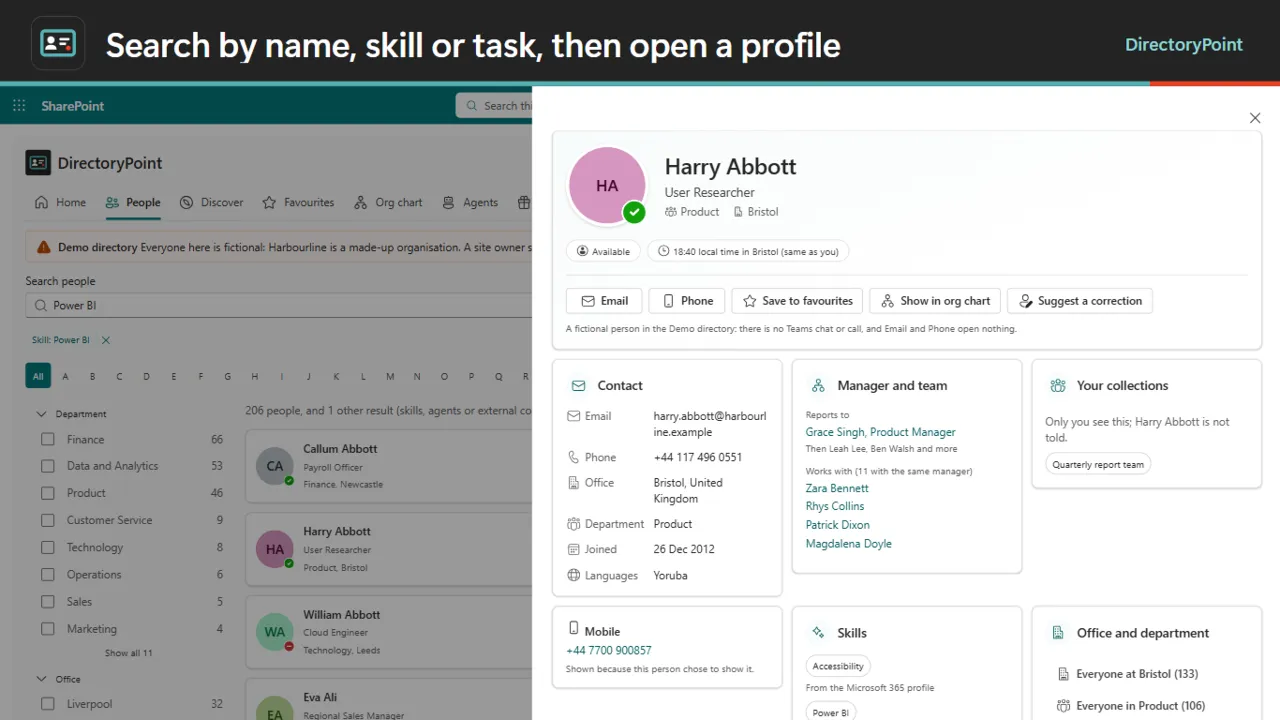
DirectoryPoint is an employee directory for SharePoint and Microsoft Teams. Name one main directory and every site, Teams tab and the personal app opens it, so people find colleagues wherever they start. Search forgives typos and knows nicknames, so "Kathryn" finds Catherine and "Bill" finds William, and you can search by name, skill, job title, department, office or language, with results as you type.
Profiles bring Teams chat, call and email together in one tap, with skills and an org chart, and search by task can list the AI agent and the people who can help. Site owners see missing photos, managers and job titles, and corrections go to IT with every decision audited. It works with no Microsoft Graph permission to start, keeps directory data in your tenant, and starts at £499 a year with a 14-day free trial.
Sources
Checked on 26 November 2026. Rules and Microsoft 365 features change, so check the source before you rely on a detail.
- Microsoft Support: Profile cards in Microsoft 365
- Microsoft Support: Use the Organization tab in Microsoft Teams
- Microsoft Support: Org Explorer
- Microsoft Support: Manage your contacts with the People app in Teams
- Microsoft Support: Add a SharePoint page, list, or document library as a tab in Teams
- Microsoft Learn: Manage user profile information in Microsoft Entra