
 Image Maps
 NavPilot
 Advanced Tabs
 HTMLPoint
 Power Popups
 Alerts Fusion
 Short URL
 QR Code Drop
 FollowPoint
 DirectoryPoint
 HRPoint
 OnboardPoint
 GovernPoint
 ExposurePoint
 UsagePoint
 InvitePoint
 VerifyPoint
 AgentPoint
 ExpiryPoint
 Handover Pro
 EquipPoint
 TidyPoint
 DisposalPoint
Four ways to build an employee directory in SharePoint
1. The People and Organization chart web parts
Modern SharePoint pages have a People web part that shows chosen people with their photo and contact details, and an Organization chart web part that shows the reporting lines around one person. Both read from Microsoft 365 profiles. They suit a "meet the team" page, but you pick each person by hand, so they are not a directory you can search.
2. People search in SharePoint and Microsoft 365
Searching from SharePoint or Microsoft 365 returns people as well as files, and the profile card shows contact details, the manager and the reporting line. It is free and always on, but it only finds what is in the profile, and it is a search box, not a page you can browse by department or office.
3. A Microsoft List
A list with columns for name, job title, department, office, phone and photo gives you a directory you can filter and sort. The catch is upkeep: it is a second copy of your people data that someone has to update for every starter, mover and leaver.
4. A directory app
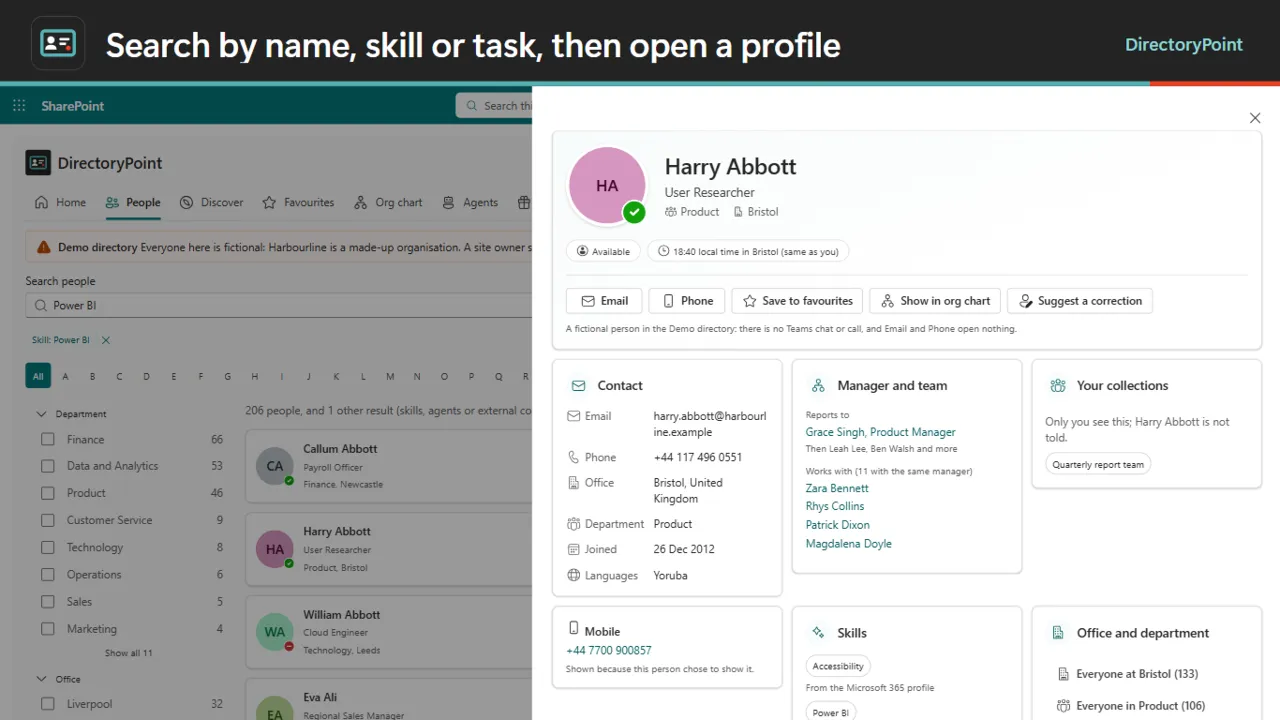
A directory web part from Microsoft Marketplace reads your Microsoft 365 profiles, so it stays current, and adds what the built-in options lack: search that forgives typos, filters, skills and an org chart, in SharePoint and Teams.
More on the two parts people ask about most: SharePoint org charts and an employee directory in Microsoft Teams.
The options compared
| People web part | People search | Microsoft List | Directory app | |
|---|---|---|---|---|
| Stays up to date | Yes, from profiles | Yes, from profiles | No, kept by hand | Yes, from profiles |
| Browse by department or office | No | No | Yes | Yes |
| Search by skill | No | Only if profiles list skills | If you add a column | Yes |
| Org chart | A separate web part | On the profile card | No | Yes |
| Works in Teams | On a SharePoint tab | Through Teams search | As a tab | Usually, as a tab or app |
| Cost | Included | Included | Included | A licence |
Good directory data comes first
Every option above is only as good as the profile data behind it. Before you choose, check how many people are missing a photo, a manager, a job title or a department in Microsoft Entra ID. A directory makes the gaps visible, which helps, but it is better to know the size of the clean-up first and agree who fixes what: usually HR for job titles and managers, and each person for their own photo and skills.
What an internal directory should show
Show what colleagues need to work together: name, photo, job title, department, office, work contact details and skills. Keep anything personal, such as a mobile number or a birthday, optional and chosen by the person, and mark external contacts clearly so nobody mistakes a supplier for a colleague.
How DirectoryPoint works
DirectoryPoint is an employee directory for SharePoint and Microsoft Teams. Search forgives typos and knows nicknames, so "Kathryn" finds Catherine and "Bill" finds William, and you can search by name, skill, job title, department, office or language. Profiles bring Teams chat, call and email together with skills and an org chart that shows every direct report, and search by task can list the AI agent and the people who can help.
Site owners see missing photos, managers and job titles, and corrections go to IT with every decision audited. It works with no Microsoft Graph permission to start, keeps directory data in your tenant, and starts at £499 a year with a 14-day free trial.
Sources
Checked on 26 November 2026. Rules and Microsoft 365 features change, so check the source before you rely on a detail.