
 Image Maps
 NavPilot
 Advanced Tabs
 HTMLPoint
 Power Popups
 Alerts Fusion
 Short URL
 QR Code Drop
 FollowPoint
 DirectoryPoint
 HRPoint
 OnboardPoint
 GovernPoint
 ExposurePoint
 UsagePoint
 InvitePoint
 VerifyPoint
 AgentPoint
 ExpiryPoint
 Handover Pro
 EquipPoint
 TidyPoint
 DisposalPoint
Start with the Asset manager list template
Microsoft Lists includes an Asset manager template for tracking physical assets: who holds each item, which items are being repaired, and check-in and check-out dates. It comes with columns such as current owner, previous owner, due date, asset tag and a status of available, reserved, in use, in repair or retired.
Add the columns your organisation needs, such as serial number, purchase date and cost, warranty end, location and supplier, then create views for overdue items, items in repair and items by location.
Add QR code labels and phone scanning
A register is only accurate if it is easy to update standing next to the equipment. That means labels and scanning:
- Give every asset a unique tag and print it as a QR code label. A random tag is safer than the SharePoint item ID, which is easy to guess and changes if you move to a new list.
- Decide what a scan opens. Either a link to the item in SharePoint, or a tag that your scanning app looks up.
- Build a scanner, if you build it yourself. The barcode reader control in Power Apps reads QR codes on Android, iOS and Windows devices and can look up the tag in your SharePoint list. It does not scan in a web browser, so test it in the Power Apps mobile app.
- Record every change. Check-outs, returns, moves and repairs should each leave a dated entry, not overwrite the last one.
Stocktakes, inspections and audits
- Stocktakes. Scan everything in a room or site and compare it with the register: found, missing and unexpected.
- Inspections. Schedule portable appliance testing (PAT) and other inspections with due dates, and keep the certificates with the asset. See PAT testing records in SharePoint.
- Faults. Let anyone report a fault with a photo, so repairs start from the asset record.
- Exports. Auditors, insurers and security assessments often ask for an up-to-date list of devices, so make sure you can export the register with its history.
Build it or use an app?
| Asset manager list | List plus a Power Apps scanner | EquipPoint | |
|---|---|---|---|
| Cost | Included | Included, plus build time | From £1,999 a year |
| QR labels | No | You design and print them | Printed on A4 label sheets |
| Scan from a phone | No | In the Power Apps mobile app | Phone camera, webcam, scanner or NFC |
| Check-out with due dates | Dates only | If you build it | Yes, with reminders and receipts |
| Stocktakes | No | If you build it | Yes |
| Inspections and faults | No | If you build it | Yes, with certificates and photos |
| Where the data lives | Your SharePoint | Your SharePoint | Your SharePoint lists |
How EquipPoint works
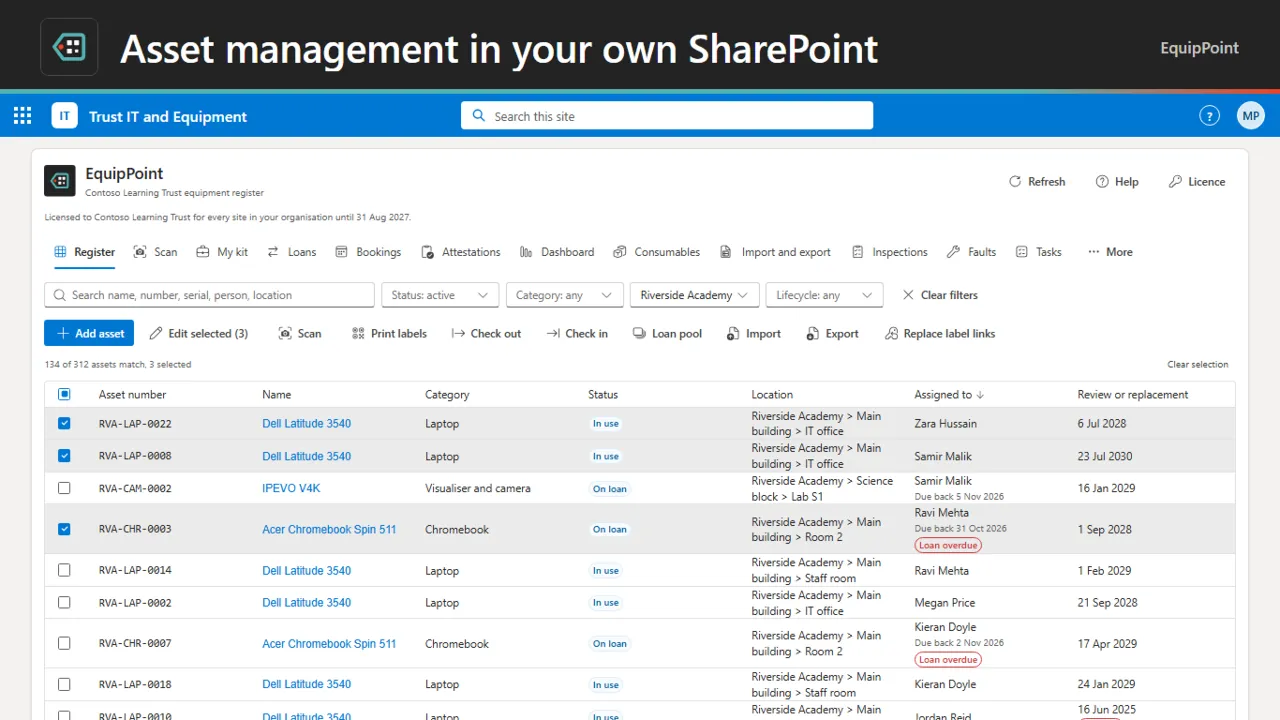
EquipPoint is scan-first asset management for SharePoint and Microsoft Teams. Your register lives in your own SharePoint lists, with custom fields, locations and a full history of every change. Print QR labels on A4 sheets or write NFC tags; each label carries a random token and opens the asset after sign-in. Check out to people, locations or other assets with due dates, reminders and a receipt, run stocktakes by scanning, and schedule PAT and other inspections with certificates.
Every plan has unlimited users and assets, the core asks for no Microsoft Graph consent, and schools get a template with the DfE register fields. Plans start at £1,999 a year with a 14-day free trial.
Sources
Checked on 26 November 2026. Rules and Microsoft 365 features change, so check the source before you rely on a detail.